 TOURZ
TOURZהמודל שלכם, כסיור בקישור.Your model, as a tour in a link.
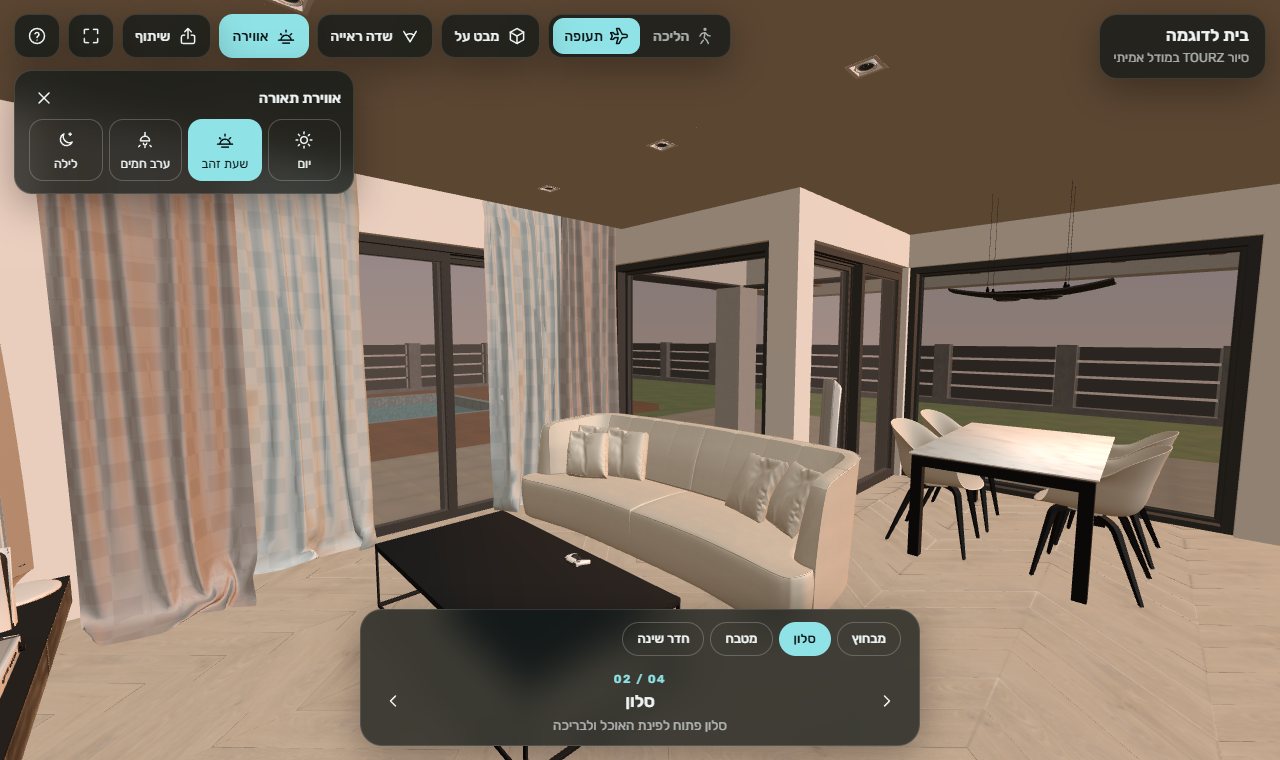
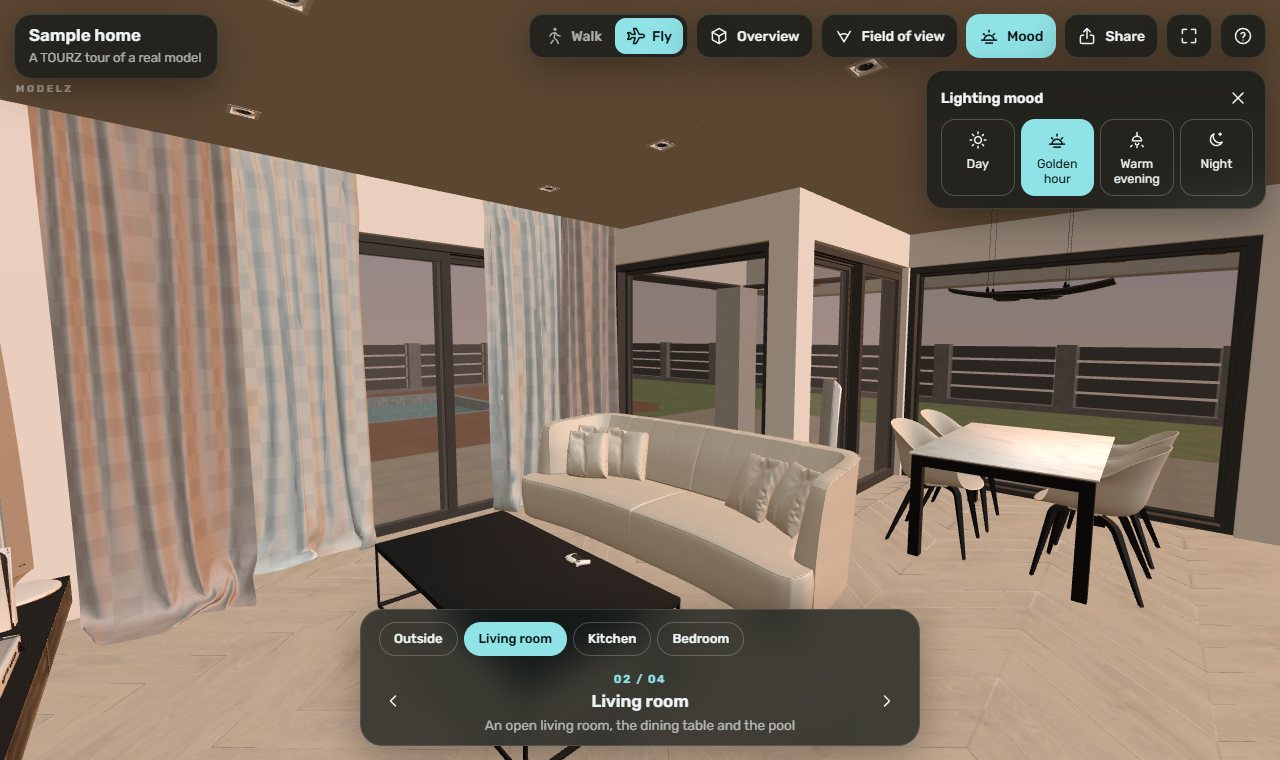
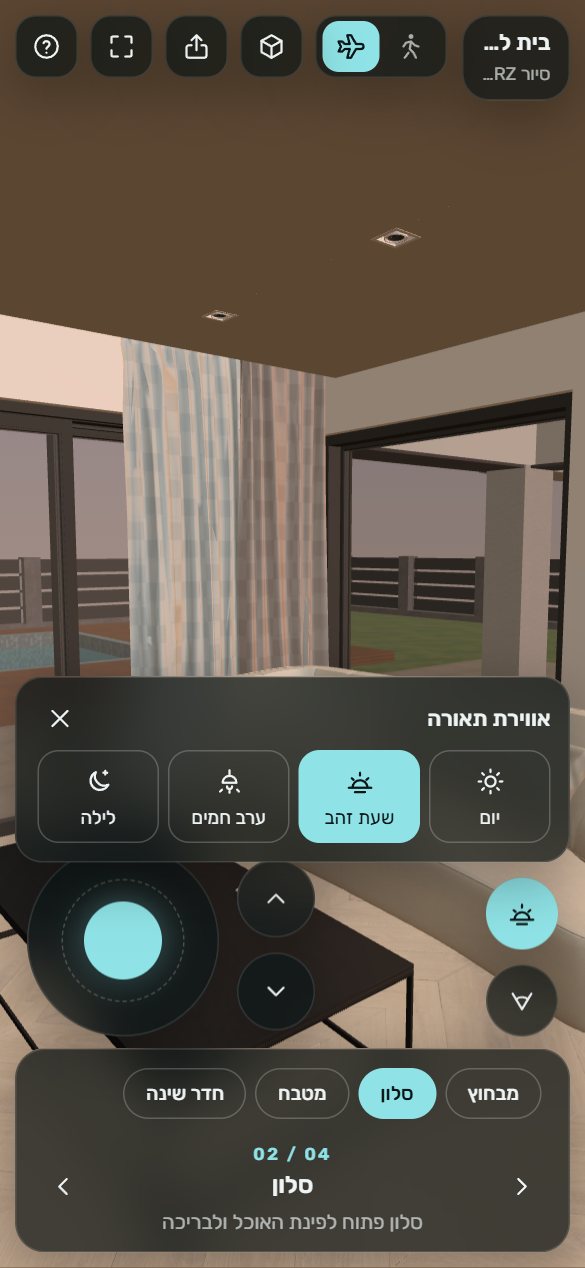
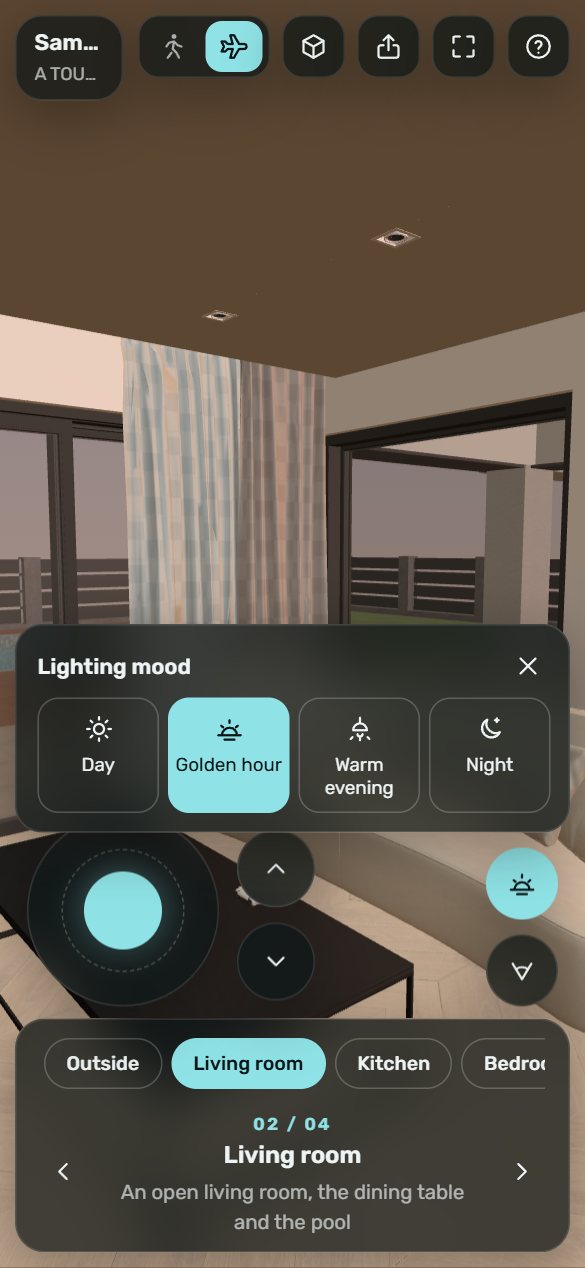
TOURZ מפרסם את המודל כסיור תלת־ממדי. שולחים קישור, והלקוחות מסתובבים בבית מהמחשב או מהטלפון, בלי להתקין כלום.TOURZ publishes the model as a 3D walkthrough. Send a link, and your clients walk through the home from a computer or a phone, with nothing to install.
- נפתח בOpens on
- מחשב וטלפוןDesktop and phone
- התקנהInstall
- אין. בלי אפליקציהNone. No app
- עדכוןUpdates
- מעדכנים את הסיור אחר כךUpdate the tour later
- חדר לקוחClient room
- הערות ואישור בקישור, בלי עלותNotes and approval at a link, free
- עלותCost
- 170-1,060 קרדיטים, לפי גודל הקובץcredits, by file size
מה TOURZ עושהWhat TOURZ does
הדרך הקצרה מהמודל שלכם אל הלקוח.The shortest way from your model to your client.
קישור אחדOne link
המודל מתפרסם כסיור תלת־ממדי בכתובת משלו. שולחים אותה במייל, בווטסאפ או איך שנוח לכם.The model is published as a 3D walkthrough at its own address. Send it by email, chat or however suits you.
מחשב וטלפוןDesktop and phone
אותו סיור נפתח בדפדפן במחשב ובטלפון.The same tour opens in the browser on a computer and on a phone.
בלי התקנה ובלי אפליקציהNo install, no app
הלקוחות לא צריכים להתקין תוכנה או אפליקציה. רק ללחוץ על הקישור.Your clients need no software or app. They just tap the link.
מעדכנים אחר כךUpdate it later
שיניתם משהו במודל? מעדכנים את הסיור הקיים, בעלות נמוכה יותר מפרסום חדש.Changed something in the model? Update the existing tour, for less than a new publish.
חדר לקוחClient room
קישור אחד ללקוח עם ההדמיות והסיור, להערות עם סיכה ולאישור העיצוב. איך זה עובדOne link for your client with the renders and the tour, for pinned notes and approving the design. How it works
אווירת תאורהLighting moods
בתוך הסיור אפשר לעבור בין יום, שעת זהב, ערב חמים ולילה, כדי להרגיש את החלל בשעות שונות. גם הלקוח יכול לעבור ביניהן, בסיור ובחדר הלקוח.Inside the tour, switch between day, golden hour, warm evening and night to feel the space at different times. Your client can switch them too, in the tour and in the client room.
TOURZחדר לקוחCLIENT ROOMמקישור אחד ועד "כן" של הלקוחFrom one link to your client's yes
מצב בתוך חלון TOURZ, בלי כלי חדש. שולחים ללקוח את ההדמיות והסיור בקישור אחד, ומקבלים בחזרה הערות על המקום המדויק ואישור עם שם ותאריך.A mode inside the TOURZ window, not another tool. Send your client the renders and the tour in one link, and get back notes on the exact spot and an approval with a name and a date.
מה הלקוח רואהWhat your client sees
- ההדמיות שבחרתם. עוברים ביניהן בחצים, בהחלקה ובכפתורי הסגנון. את המודל עצמו הלקוח לא רואה, רק את ההדמיות.The renders you picked. They move between them with arrows, a swipe or the style buttons. Your client never sees the bare model, only the renders.
- הסיור התלת־ממדי. נטען רק כשלוחצים עליו, עם החומרים של המודל ואווירות התאורה.The 3D tour. It loads only when they tap it, with the model's own materials and the lighting moods.
- "הוספת הערה". נוגעים במקום בהדמיה או בסיור, כותבים ושולחים. הסיכה שומרת את המקום המדויק."Add a note". They tap a spot on a render or in the tour, write and send. The pin keeps the exact spot.
- "אישור העיצוב". מקלידים שם, ונשמרים התאריך ומספר הגרסה."Approve the design". They type a name, and the date and the version number are saved.
- בלי התקנה ובלי הרשמה, בטלפון או במחשב, בעברית או באנגלית.No install and no sign-up, on a phone or a computer, in Hebrew or English.
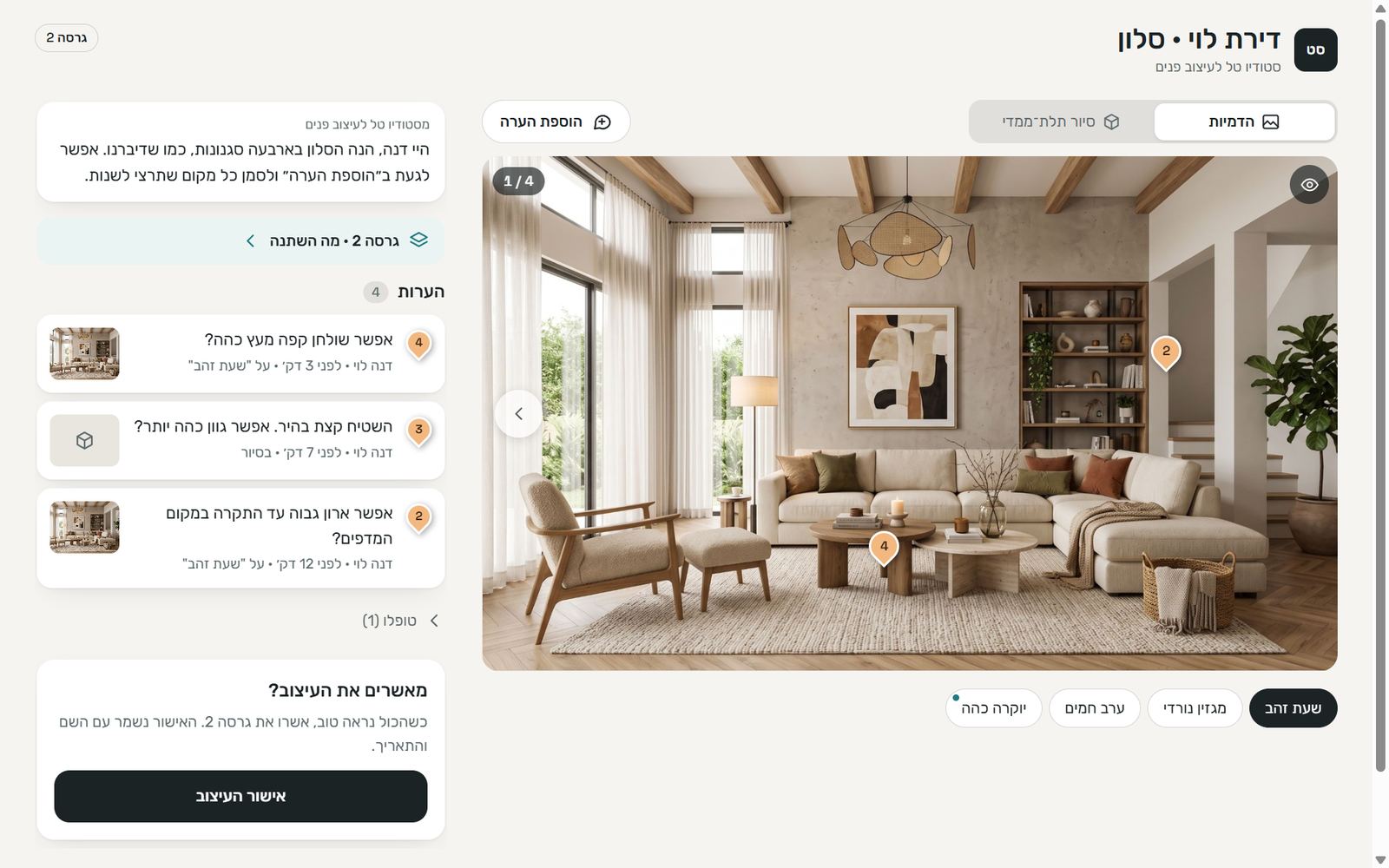
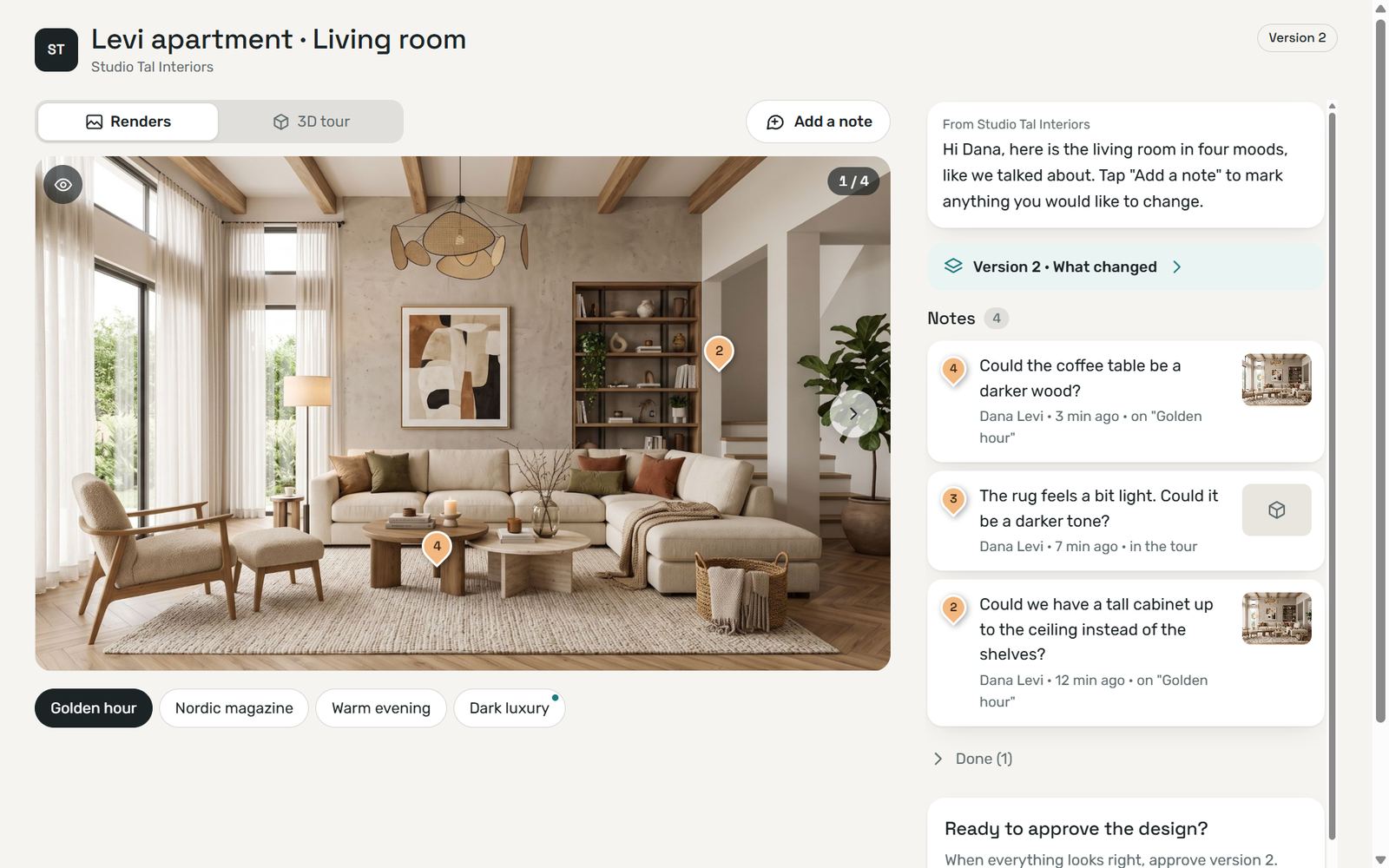
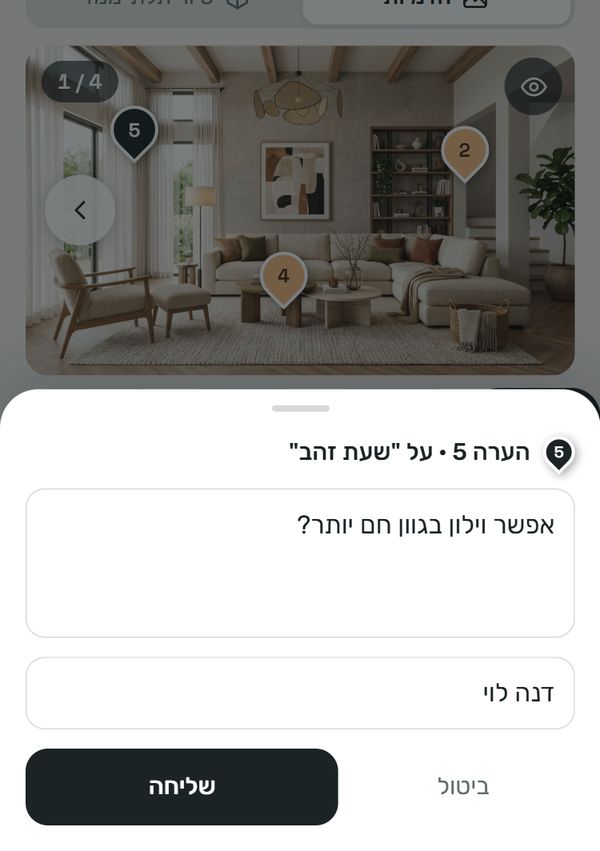
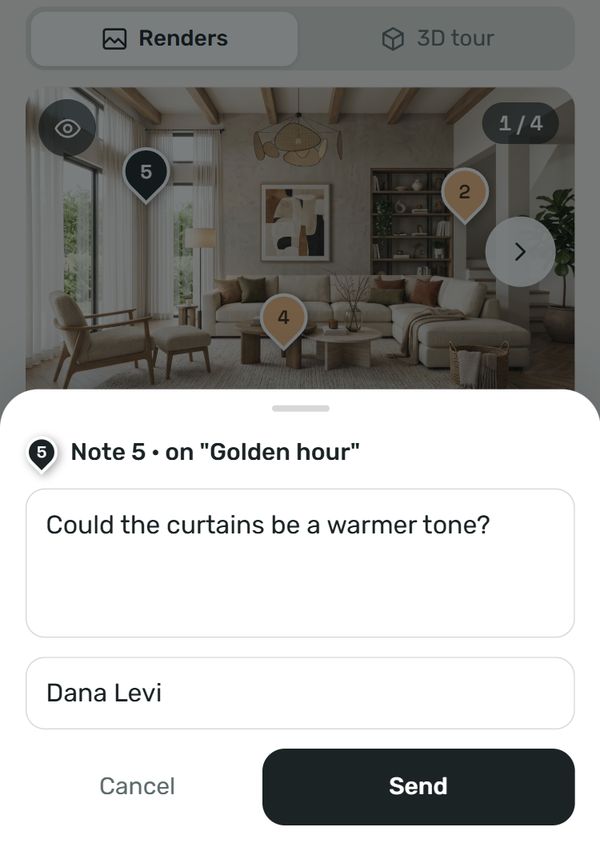
מה אתם עושים ב־TOURZWhat you do in TOURZ
-
בוחרים ושולחיםPick and send
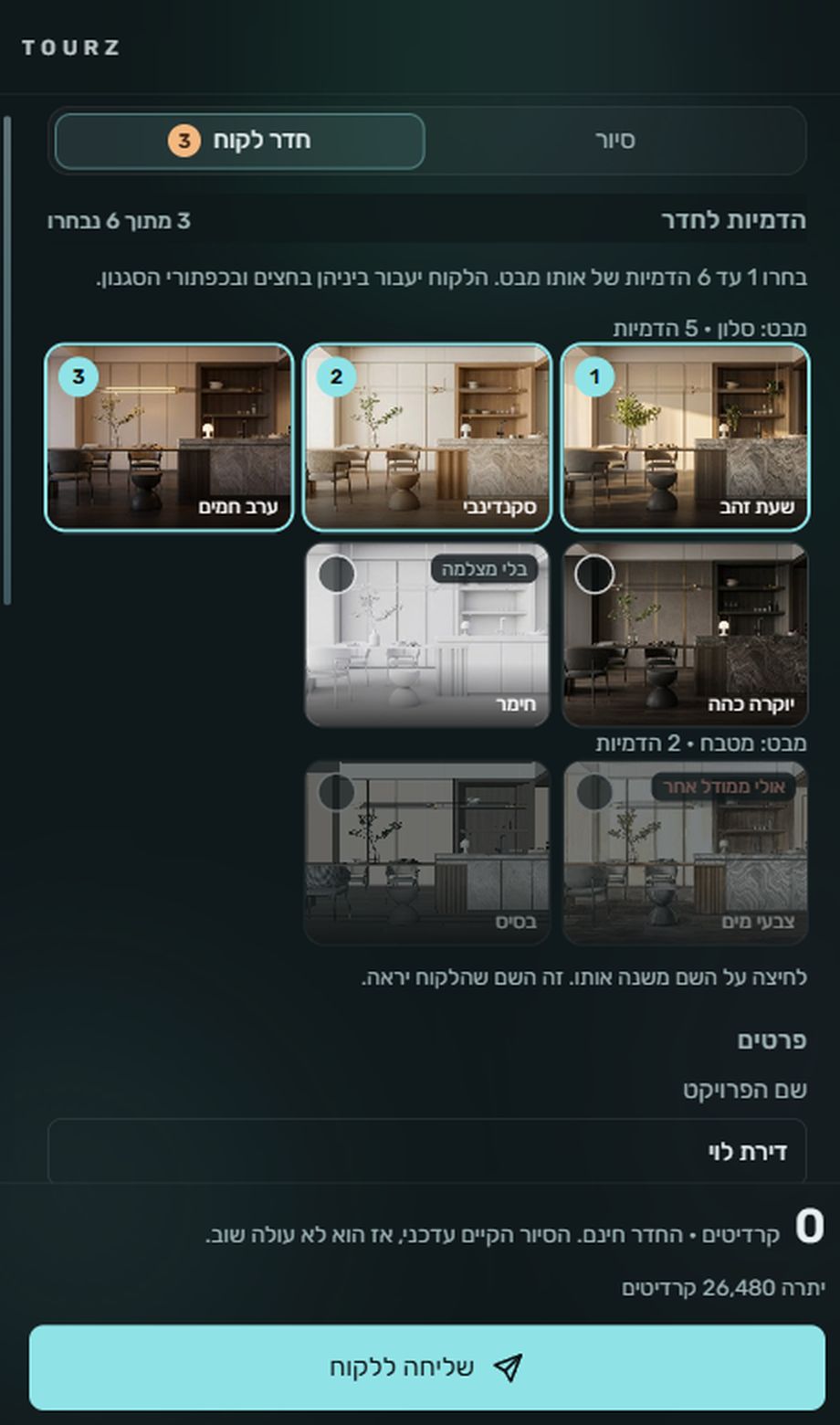
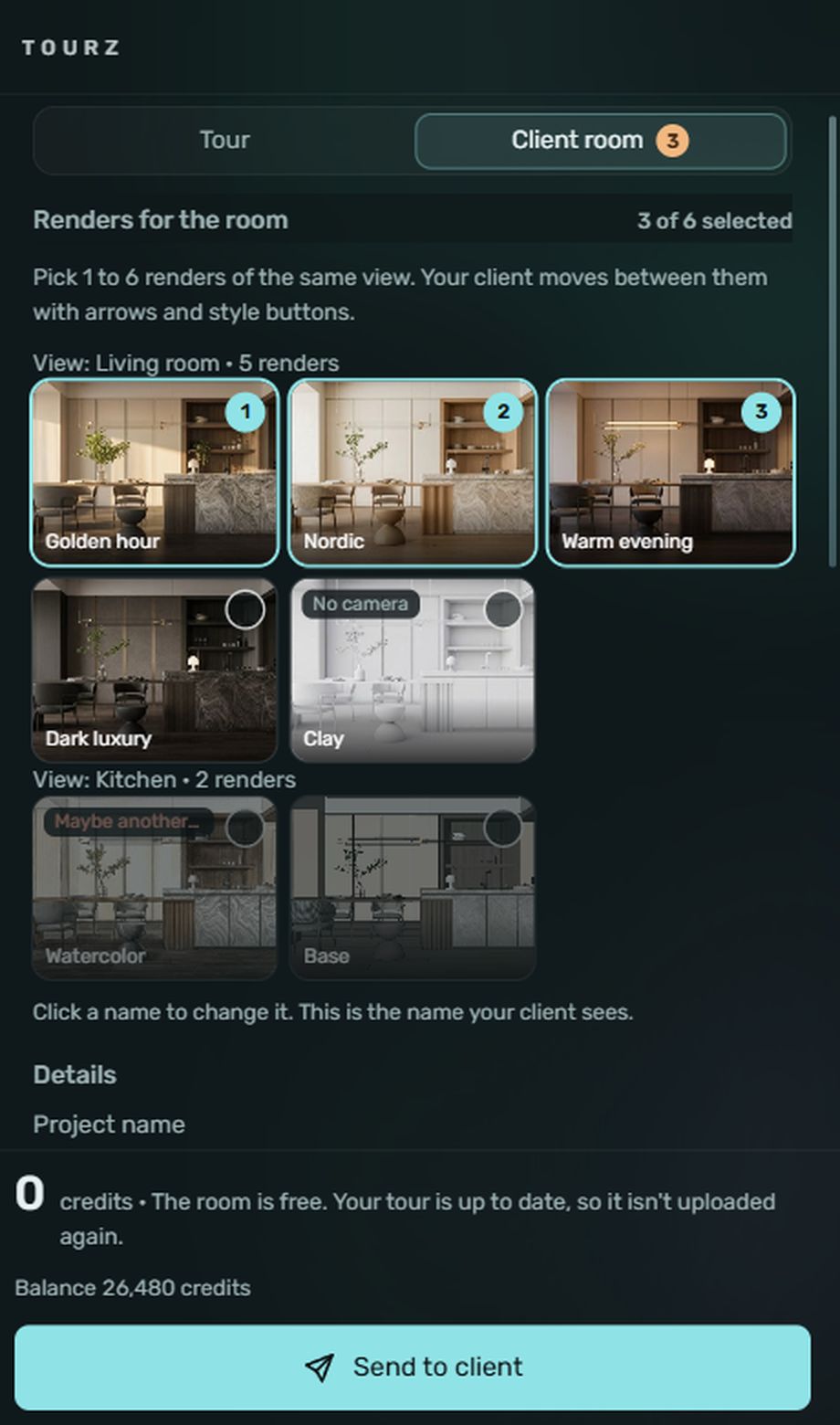
עוברים ל"חדר לקוח" ובוחרים 1 עד 6 הדמיות של אותו מבט מ־RENDERZ. מוסיפים שם פרויקט והודעה, ולוחצים "שליחה ללקוח". המחיר מוצג לפני השליחה.Switch to "Client room" and pick 1 to 6 RENDERZ images of one view. Add a project name and a message, and click "Send to client". The price shows before you send.
-
הקישור יוצאThe link goes out
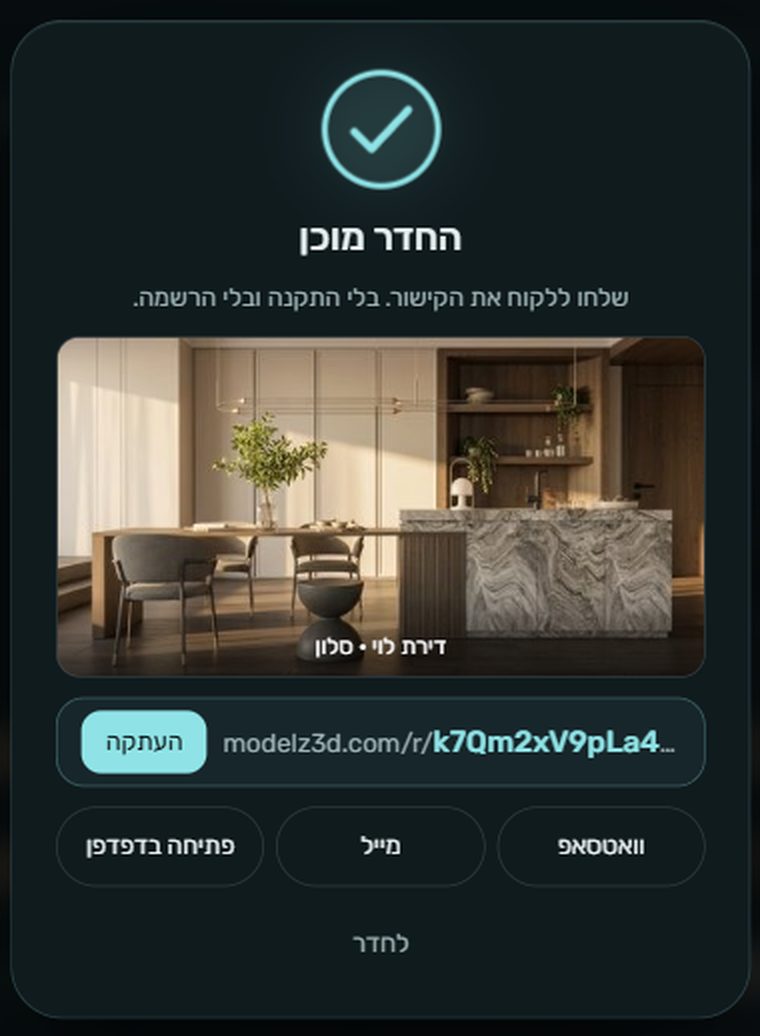
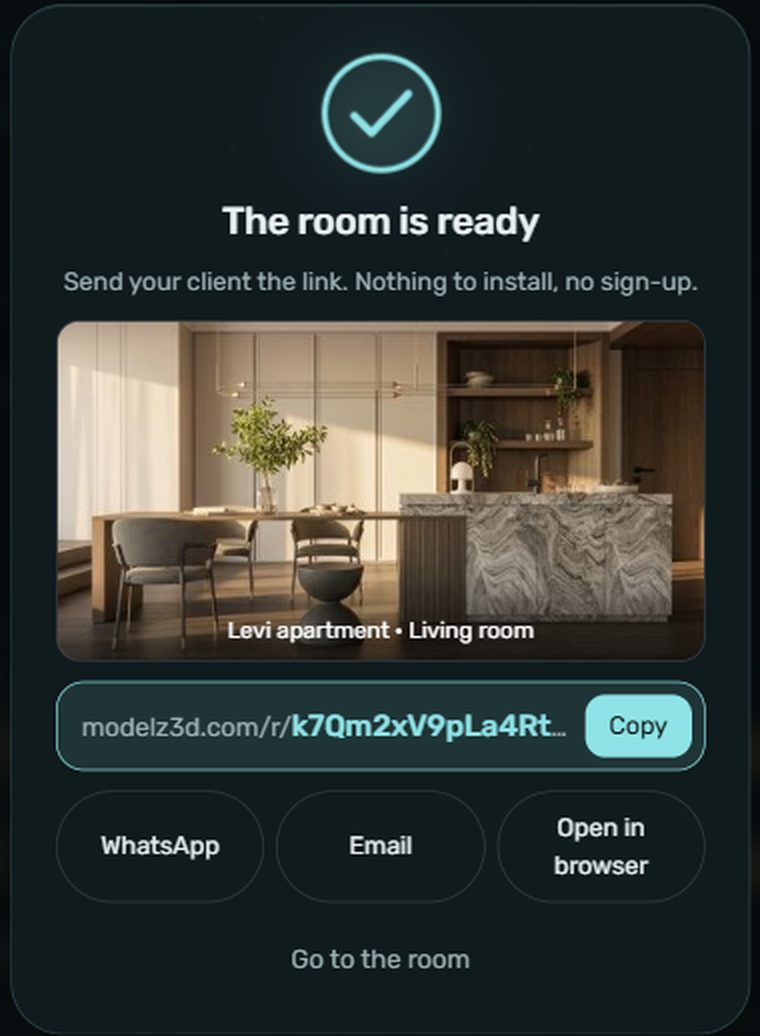
מקבלים קישור modelz3d.com/r/… ושולחים אותו בהעתקה, בוואטסאפ או במייל. החדר נשמר במודל ומחכה לכם כשתפתחו אותו שוב.You get a modelz3d.com/r/… link and send it by copy, WhatsApp or email. The room is saved with the model and waits for you when you open it again.
-
ההערות חוזרות אליכםThe notes come back to you
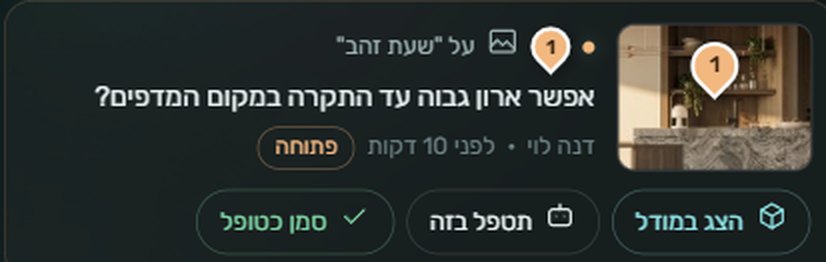
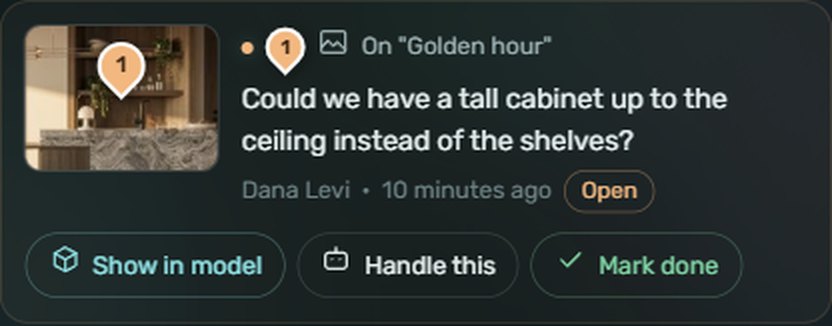
כל הערה מגיעה עם צילום של המבט, ואתם מקבלים מייל והודעה. "הצג במודל" מעביר את המצלמה למקום ומסמן אותו, ו"תטפל בזה" שולח את ההערה ל־AGENTZ.Each note arrives with a snapshot of the view, and you get an email and a notice. "Show in model" moves the camera to the spot and marks it, and "Handle this" sends the note to AGENTZ.
גרסה 2, על אותו קישורVersion 2, on the same link
תיקנתם? "עדכון החדר" שולח גרסה חדשה לאותו קישור. "מה השתנה" ממולא מראש מההערות שטיפלתם בהן, והן מקבלות ✓ אצל הלקוח. אפשר להחליף ולהוסיף הדמיות. אישור קודם נשאר רשום, וגרסה חדשה מחכה לאישור משלה. אפשר גם לסגור את החדר לקריאה בלבד או למחוק אותו.Made the fixes? "Update the room" sends a new version to the same link. "What changed" is filled in from the notes you handled, and your client sees them with a ✓. You can swap or add renders. An earlier approval stays on record, and a new version waits for its own. You can also close the room to read-only or delete it.
Starter
- באדג׳ "נוצר עם Modelz" בחדרA "Made with Modelz" badge in the room
- עד 3 גרסאות לחדרUp to 3 versions per room
- עמוד סיכום להדפסהA summary page to print
Pro · Studio · Teams
- בלי באדג׳No badge
- גרסאות בלי הגבלהUnlimited versions
- עמוד סיכום להדפסהA summary page to print
| בחדר לקוחIn a client room | קרדיטיםCredits |
|---|---|
| החדר, ההערות והאישורThe room, the notes and the approval | 0 |
| הסיור, כשהוא עדכניThe tour, when it is up to dateלא עולה שובNot uploaded again | 0 |
| הסיור, כשהמודל השתנהThe tour, when the model changedעדכון של הסיור הקייםAn update of the existing tour | מ־90From 90 |
| הסיור, כשעוד אין סיורThe tour, when there is none yet170, ועוד 11 לכל MB170, plus 11 per MB | 170-1,060 |
| ההדמיותThe rendersכבר שולמו כשנוצרו ב־RENDERZAlready paid for when RENDERZ made them | 0 |
- "תטפל בזה" עולה כמו כל שינוי ב־AGENTZ, ורק כשאתם לוחצים."Handle this" costs what any AGENTZ change costs, and only when you click it.
- שליחה שנכשלה לפני שהסיור עלה לא מחויבת.A send that fails before the tour is up is not charged.
איך משתמשיםHow to use it
מסיימים את המודלFinish the model
הסיור מראה את המודל כמו שהוא ברגע הפרסום.The tour shows the model as it is when you publish.
פותחים את TOURZOpen TOURZ
מסרגל הכלים של Modelz. המחיר מוצג לפני הפרסום.From the Modelz toolbar. The price shows before you publish.
מפרסמים ומשתפיםPublish and share
מקבלים קישור ושולחים אותו ללקוח.You get a link and send it to your client.
מעדכנים כשצריךUpdate when needed
אחרי שינויים במודל, מעדכנים את אותו סיור.After changes to the model, update the same tour.
לפני ששולחים ללקוחBefore you send it
כמה בדיקות קטנות שעושות סיור טוב יותר.A few small checks for a better tour.
- מודל קל יותר, סיור זול יותרA lighter model, a cheaper tour
המחיר תלוי בגודל הקובץ. פריטים שלא רואים בסיור אפשר להסיר לפני הפרסום.The price depends on file size. Remove things nobody will see in the tour before you publish.
- תפתחו קודם בטלפון שלכםOpen it on your own phone first
הלקוחות יכולים לפתוח את הקישור גם בטלפון. כדאי לראות איך זה נראה שם לפני ששולחים.Clients can open the link on a phone too. See how it looks there before you send it.
- עדכון במקום סיור חדשUpdate instead of re-publishing
אחרי תיקונים, עדכון של הסיור הקיים מתחיל מ־90 קרדיטים, פחות מפרסום חדש.After fixes, updating the existing tour starts at 90 credits, less than a new publish.
- חומרים לפני פרסוםMaterials before publishing
הסיור מראה את החומרים והצבעים שבמודל. כדאי לסגור אותם קודם, למשל ב־AGENTZ.The tour shows the materials and colors in the model. Settle them first, for example with AGENTZ.

כמה זה עולהWhat it costs
המחיר תלוי בגודל הקובץ של המודל, עם תקרה. הוא מוצג לפני שמפרסמים.The price depends on the model's file size, with a cap. It shows before you publish.
צפייה במחיריםSee pricing| פעולהAction | קרדיטיםCredits |
|---|---|
| פרסום סיורPublish a tour170, ועוד 11 לכל MB170, plus 11 per MB | 170-1,060 |
| לדוגמה: מודל של 20 MBExample: a 20 MB model170 + 220170 + 220 | 390 |
| עדכון סיור קייםUpdate an existing tour | מ־90From 90 |
- פרסום סיורים דורש הרשמה. 1,000 הקרדיטים שמקבלים בהתקנה לא כוללים אותו.Publishing tours needs an account. The 1,000 install credits do not cover it.
- התקרה לפרסום היא 1,060 קרדיטים, גם למודל גדול.A publish is capped at 1,060 credits, even for a large model.
ממשיכים מכאןWhere to go next
 RENDERZ
 AGENTZ
 MODELZ
תנו ללקוחות להסתובב בביתLet your clients walk the home
מתקינים, נרשמים, ומפרסמים את הסיור הראשון.Install, sign up and publish your first tour.