 TOURZ
המודל שלכם, כסיור בקישור.Your model, as a tour in a link.
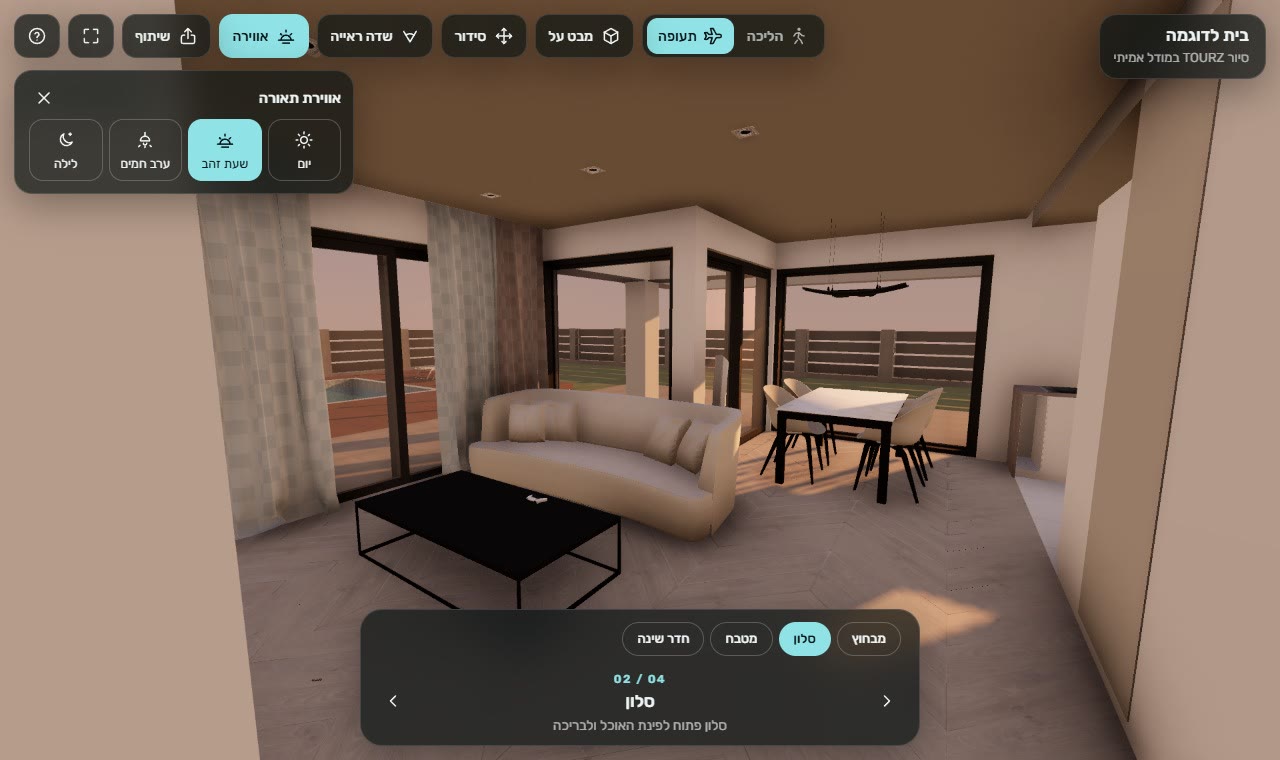
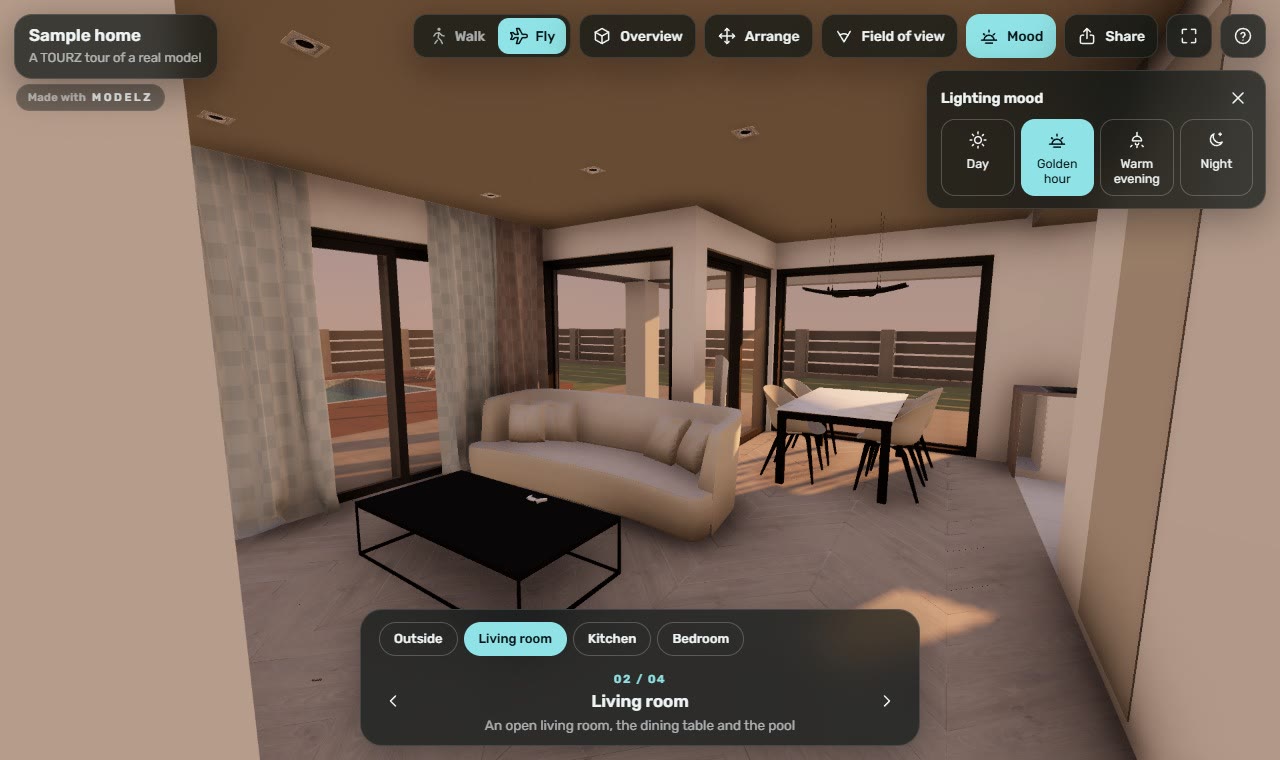
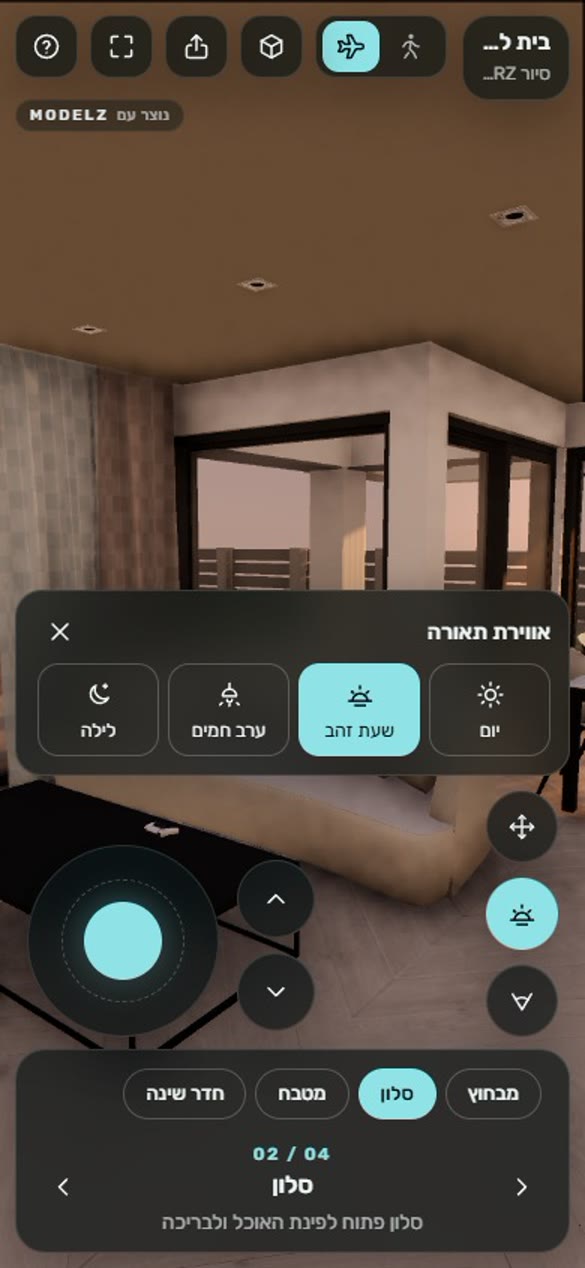
TOURZ מפרסם את המודל כסיור תלת־ממדי. שולחים קישור, והלקוחות מסתובבים בבית מהמחשב או מהטלפון, בלי להתקין כלום.TOURZ publishes the model as a 3D walkthrough. Send a link, and your clients walk through the home from a computer or a phone, with nothing to install.
- מכשיריםOpens on
- מחשב וטלפוןDesktop and phone
- התקנהInstall
- בלי אפליקציהNo app
- עדכוןUpdates
- מעדכנים את הסיור אחר כךUpdate the tour later
- חדר לקוחClient room
- הערות ואישור בקישור, בלי הרשמה ללקוחNotes and approval at a link, no sign-up for your client
- עלותCost
- 0 קרדיטים, כלול בכל מסלולcredits, included in every plan
- מכשיריםOpens on
- מחשב וטלפוןDesktop and phone
- התקנהInstall
- בלי אפליקציהNo app
- עדכוןUpdates
- מעדכנים את הסיור אחר כךUpdate the tour later
- חדר לקוחClient room
- הערות ואישור בקישור, בלי הרשמה ללקוחNotes and approval at a link, no sign-up for your client
- עלותCost
- 0 קרדיטים, כלול בכל מסלולcredits, included in every plan
מה TOURZ עושה. המודל שלכם, בקישור.What TOURZ does. Your model, at a link.
הדרך הקצרה מהמודל שלכם אל הלקוח.The shortest way from your model to your client.
קישור אחדOne link
המודל מתפרסם כסיור תלת־ממדי בכתובת משלו. שולחים אותה במייל, בוואטסאפ או איך שנוח לכם.The model is published as a 3D walkthrough at its own address. Send it by email, WhatsApp or however suits you.
מחשב וטלפוןDesktop and phone
אותו סיור נפתח בדפדפן במחשב ובטלפון.The same tour opens in the browser on a computer and on a phone.
בלי התקנה ובלי אפליקציהNo install, no app
הלקוחות לא צריכים להתקין תוכנה או אפליקציה. רק ללחוץ על הקישור.Your clients need no software or app. They just tap the link.
מעדכנים אחר כךUpdate it later
שיניתם משהו במודל? מעדכנים את הסיור הקיים, בלי עלות, והקישור נשאר אותו קישור.Changed something in the model? Update the existing tour at no cost, and the link stays the same.
חדר לקוחClient room
קישור אחד ללקוח עם ההדמיות והסיור, להערות עם סיכה ולאישור העיצוב. לחדר הלקוחOne link for your client with the renders and the tour, for pinned notes and approving the design. See the client room
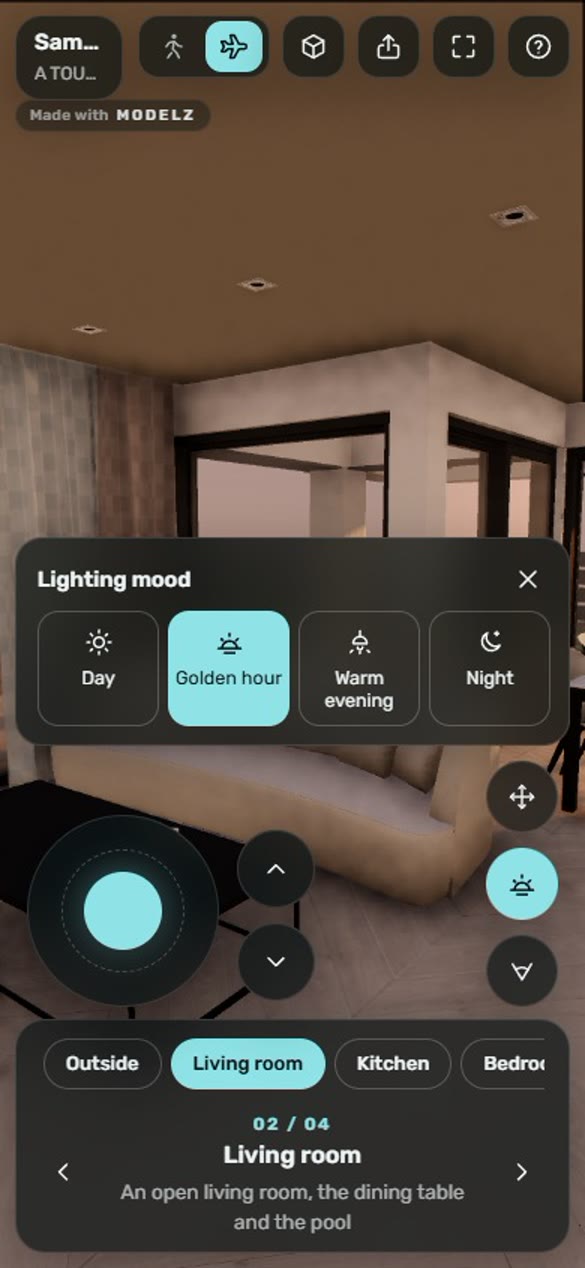
אווירת תאורהLighting moods
בתוך הסיור אפשר לעבור בין יום, שעת זהב, ערב חמים ולילה, כדי להרגיש את החלל בשעות שונות. גם הלקוח יכול לעבור ביניהן, בסיור ובחדר הלקוח.Inside the tour, switch between day, golden hour, warm evening and night to feel the space at different times. Your client can switch them too, in the tour and in the client room.
TOURZחדר לקוחCLIENT ROOMמקישור אחד ועד "כן" של הלקוח.From one link to your client's yes.
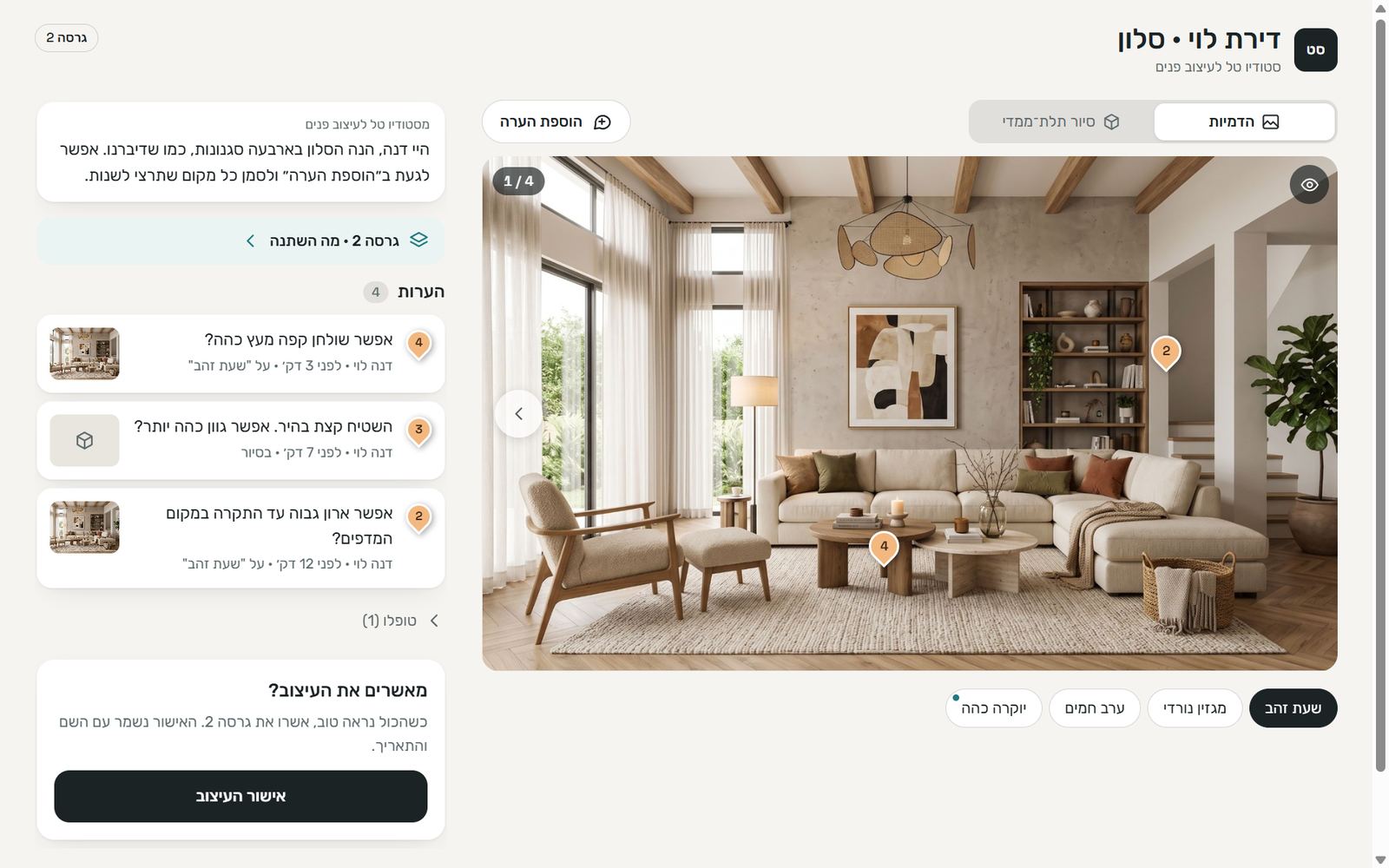
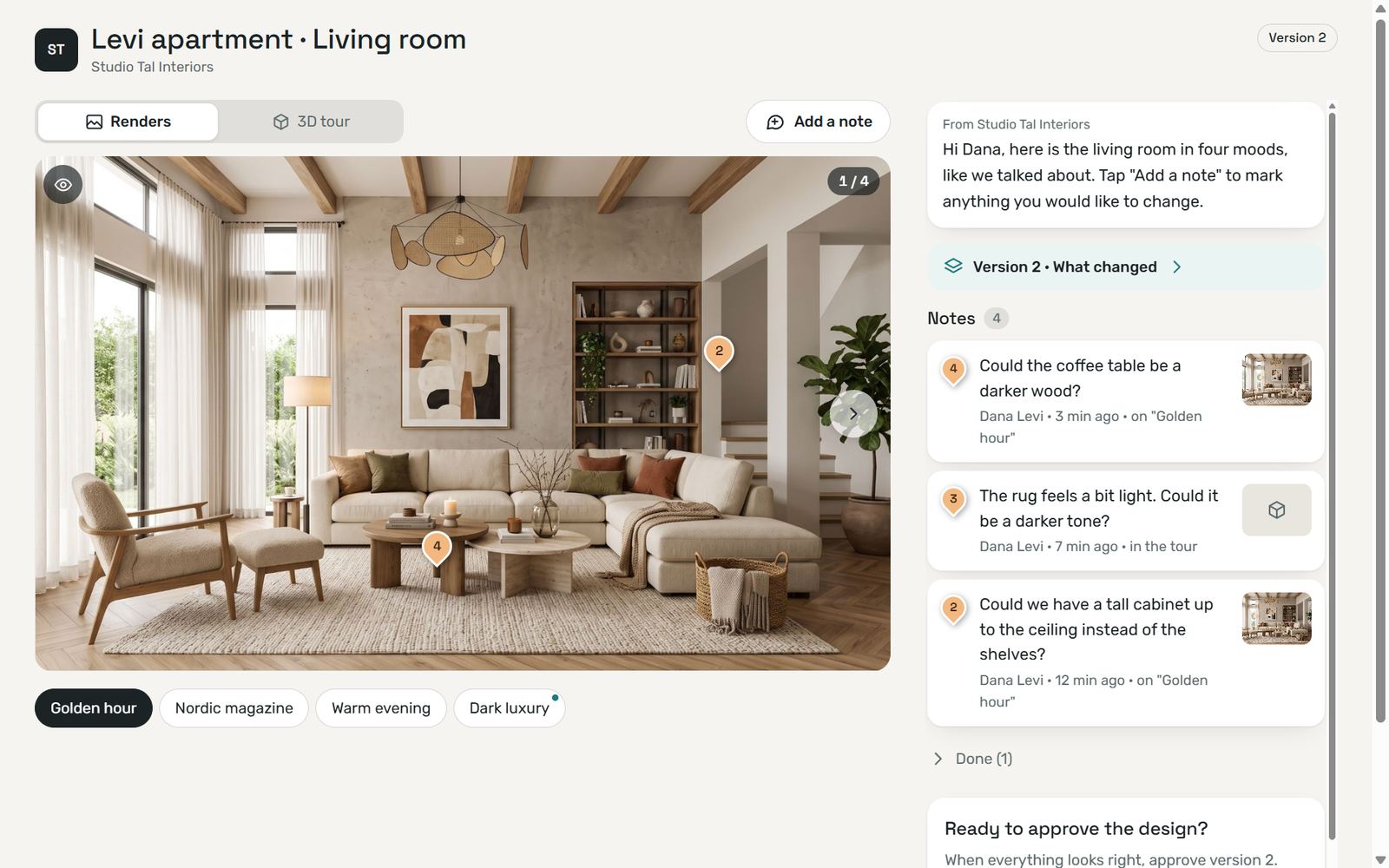
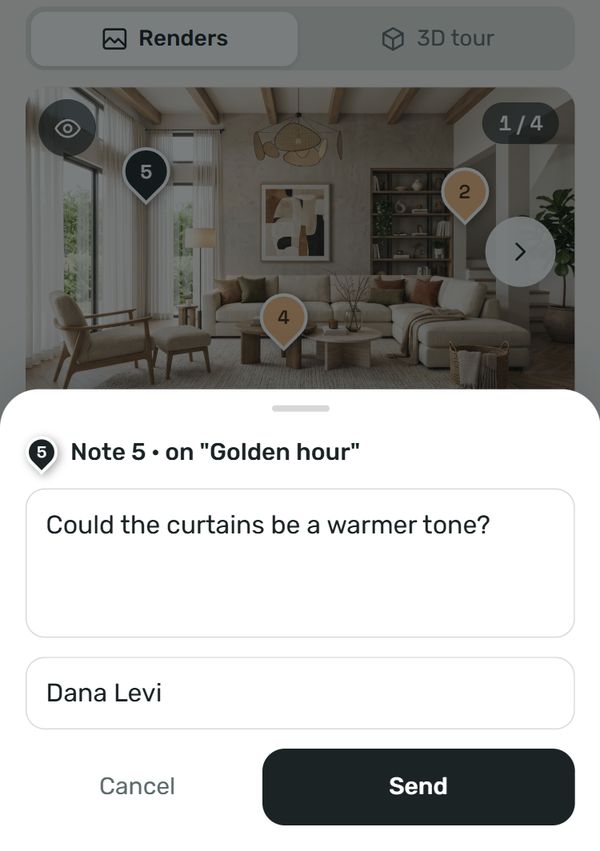
מצב בתוך חלון TOURZ, בלי כלי חדש. שולחים ללקוח את ההדמיות והסיור בקישור אחד, ומקבלים בחזרה הערות על המקום המדויק ואישור עם שם ותאריך.A mode inside the TOURZ window, not another tool. Send your client the renders and the tour in one link, and get back notes on the exact spot and an approval with a name and a date.
מה הלקוח רואהWhat your client sees
- ההדמיות שבחרתם. עוברים ביניהן בחצים, בהחלקה ובכפתורי הסגנון. הלקוח רואה רק מה שבחרתם: ההדמיות, והסיור עם החומרים.The renders you picked. They move between them with arrows, a swipe or the style buttons. Your client sees only what you picked: the renders, and the tour with its materials.
- הסיור התלת־ממדי. נטען רק כשלוחצים עליו, עם החומרים של המודל ואווירות התאורה.The 3D tour. It loads only when they tap it, with the model's own materials and the lighting moods.
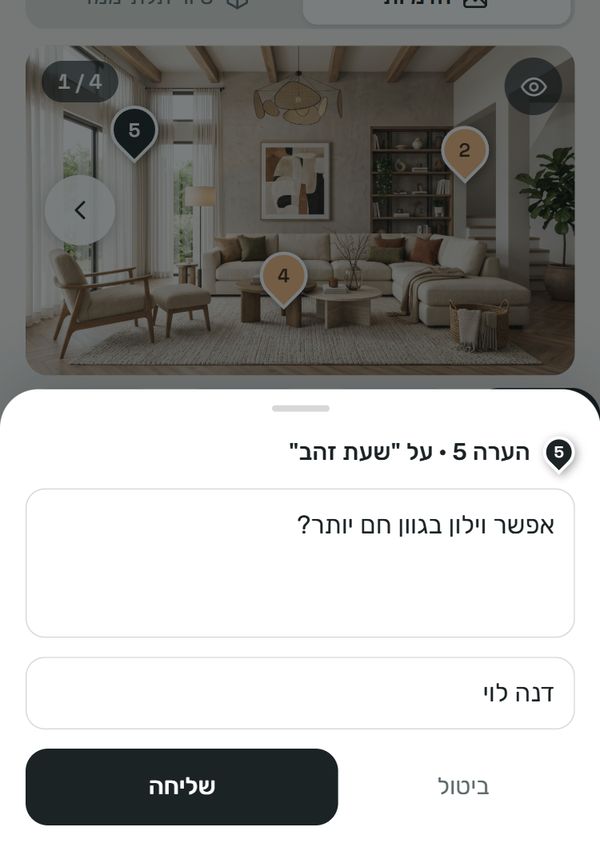
- "הוספת הערה". נוגעים במקום בהדמיה או בסיור, כותבים ושולחים. הסיכה שומרת את המקום המדויק."Add a note". They tap a spot on a render or in the tour, write and send. The pin keeps the exact spot.
- "אישור העיצוב". מקלידים שם, ונשמרים התאריך ומספר הגרסה."Approve the design". They type a name, and the date and the version number are saved.
- בלי התקנה ובלי הרשמה, בטלפון או במחשב, בעברית או באנגלית.No install and no sign‑up, on a phone or a computer, in Hebrew or English.
מה אתם עושים ב־TOURZWhat you do in TOURZ
-
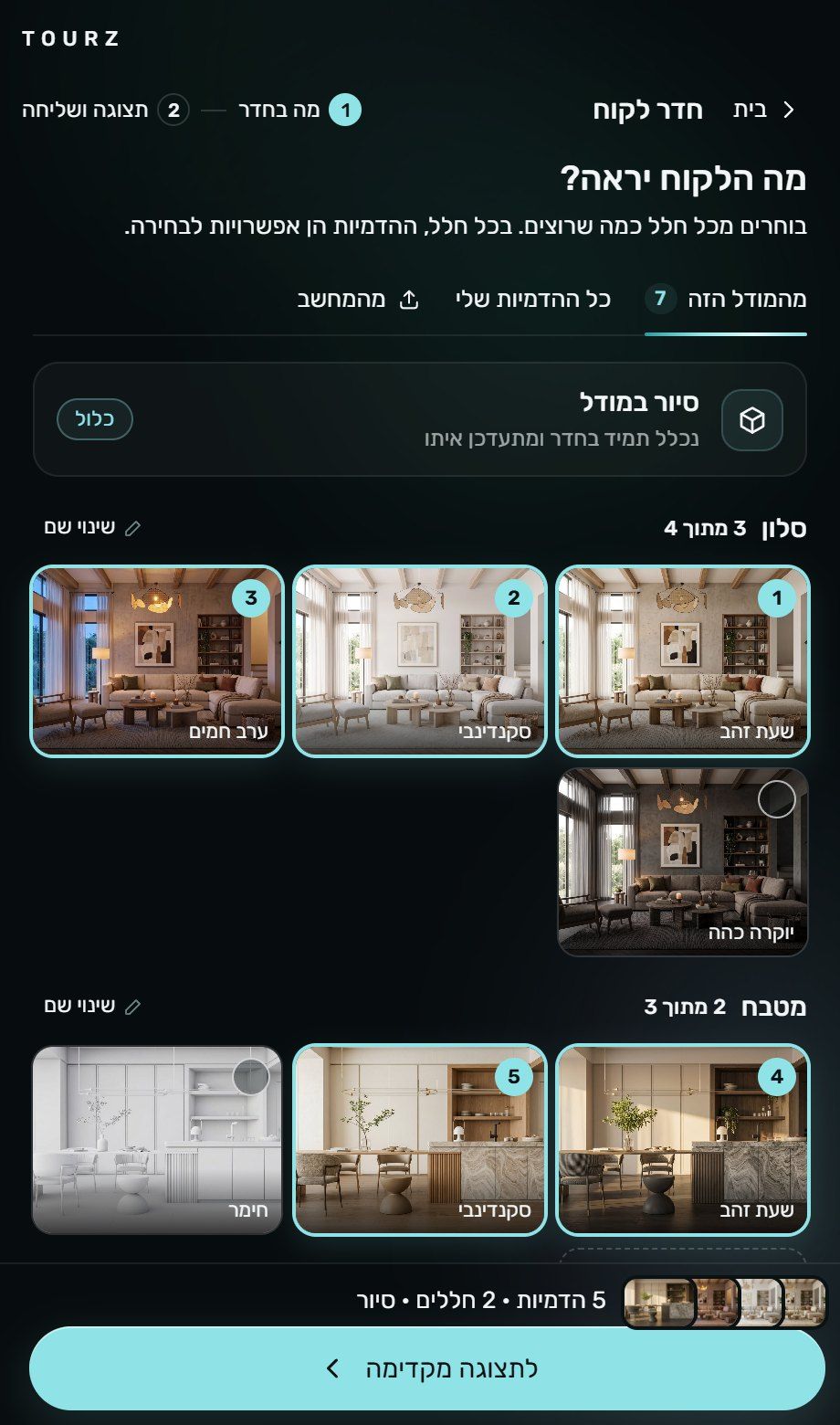
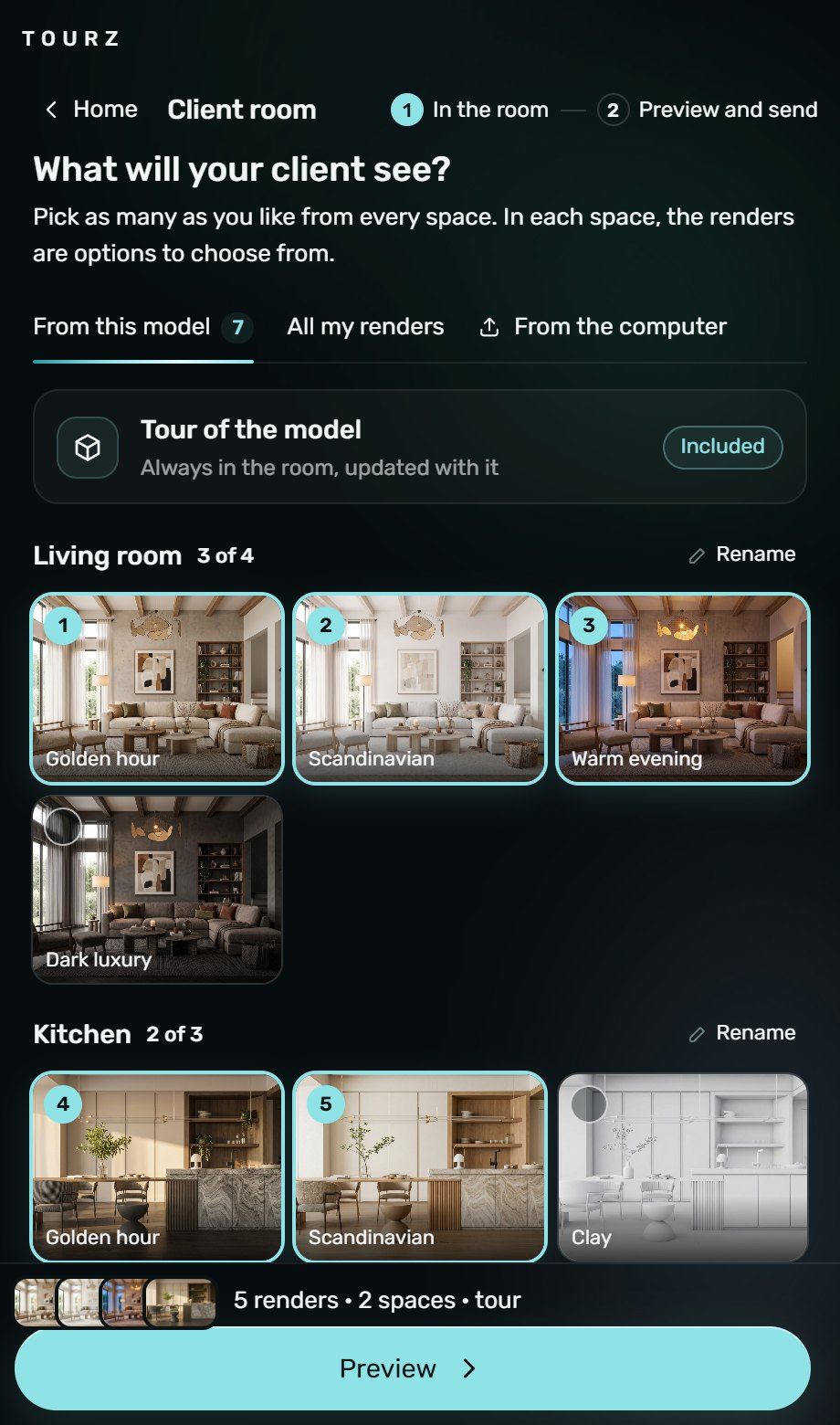
בוחרים ושולחיםPick and send
לוחצים "פתיחת חדר לקוח" ובוחרים עד 12 הדמיות, מחלל אחד או מכמה. מוסיפים את שם הלקוח והודעה, ולוחצים "שליחה וקבלת קישור".Click "Open a client room" and pick up to 12 renders, from one space or several. Add your client's name and a message, and click "Send and get the link".
-
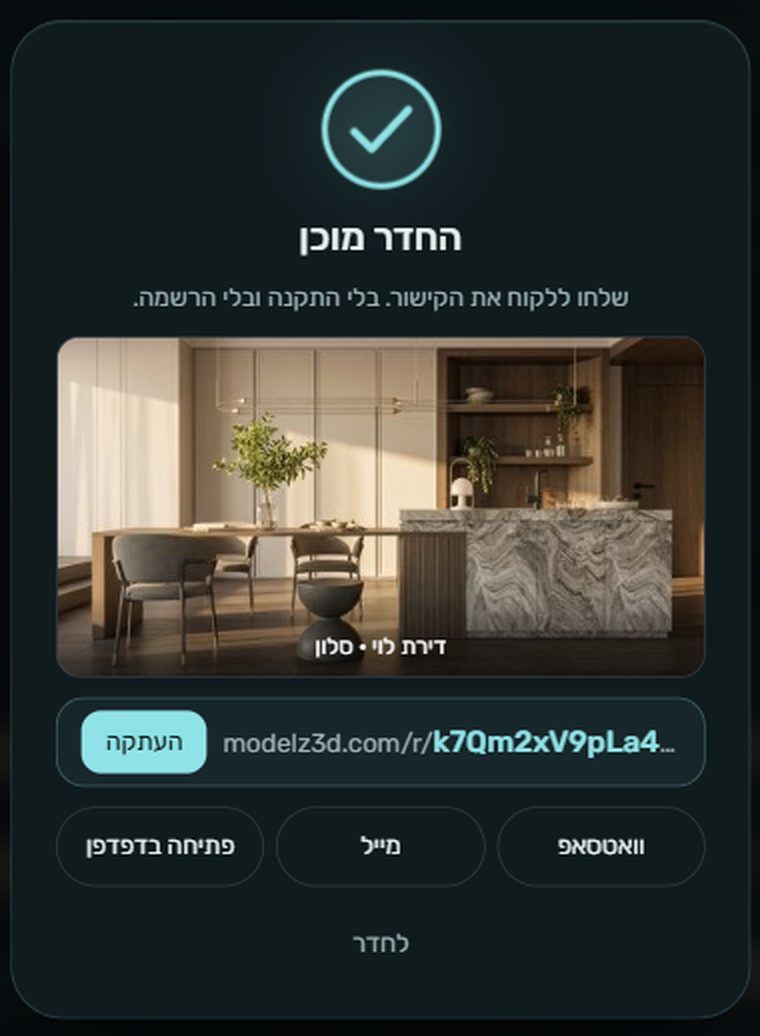
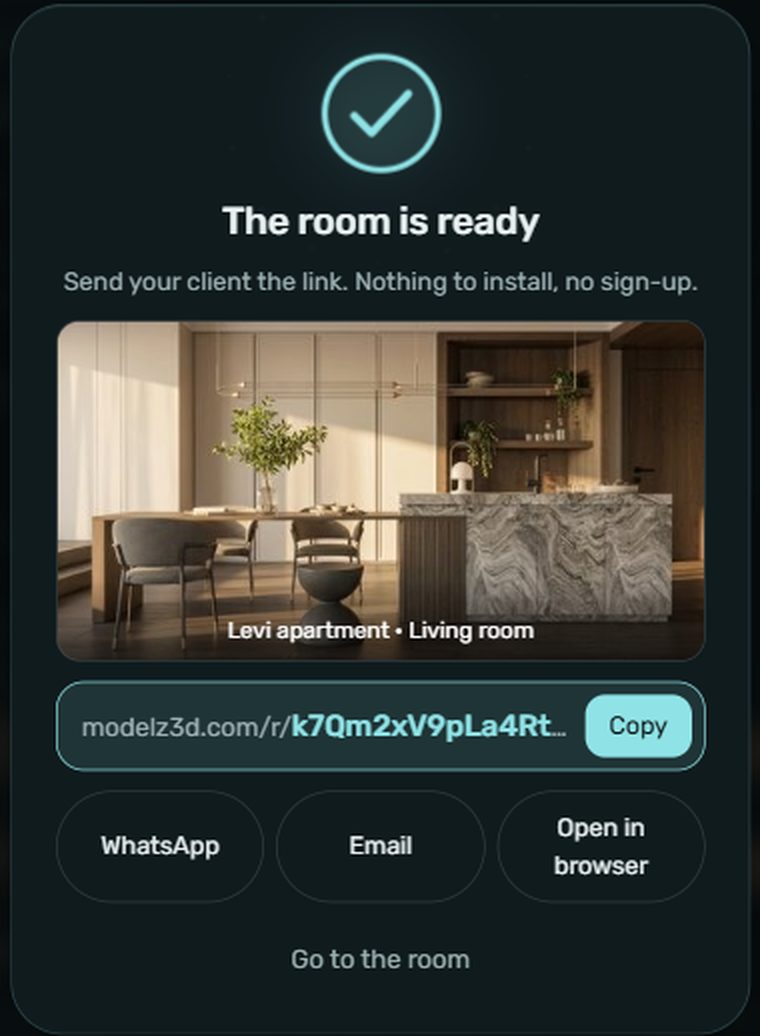
הקישור יוצאThe link goes out
מקבלים קישור modelz3d.com/r/… ושולחים אותו בהעתקה, בוואטסאפ או במייל. החדר נשמר במודל ומחכה לכם כשתפתחו אותו שוב.You get a modelz3d.com/r/… link and send it by copy, WhatsApp or email. The room is saved with the model and waits for you when you open it again.
-
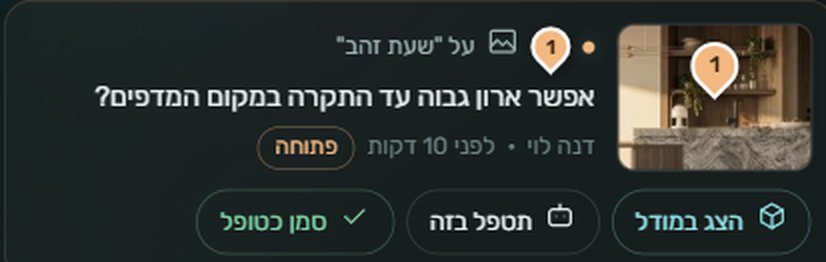
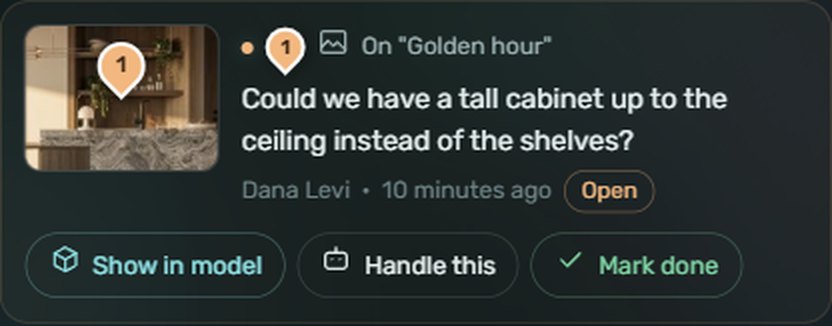
ההערות חוזרות אליכםThe notes come back to you
כל הערה מגיעה עם צילום של המבט, ותקבלו עליה מייל (ובתוסף גם הודעה). "תטפל בזה" שולח אותה ל־AGENTZ, ו"הצג במודל" (בתוסף) מעביר את המצלמה למקום ומסמן אותו.Each note arrives with a snapshot of the view, and you get an email, plus a notice in the plugin. "Handle this" sends the note to AGENTZ, and in the plugin "Show in model" moves the camera to the spot and marks it.
גרסה 2, על אותו קישורVersion 2, on the same link
תיקנתם? "עדכון החדר" שולח גרסה חדשה לאותו קישור. "מה השתנה" ממולא מראש מההערות שטיפלתם בהן, והן מקבלות ✓ אצל הלקוח. אפשר להחליף ולהוסיף הדמיות. אישור קודם נשאר רשום, וגרסה חדשה מחכה לאישור משלה. אפשר גם לסגור את החדר לקריאה בלבד או למחוק אותו.Made the fixes? "Update the room" sends a new version to the same link. "What changed" is filled in from the notes you handled, and your client sees them with a ✓. You can swap or add renders. An earlier approval stays on record, and a new version waits for its own. You can also close the room to read‑only or delete it.
Weekend
- באדג׳ "נוצר עם Modelz" בחדרA "Made with Modelz" badge in the room
- עד 3 גרסאות לחדרUp to 3 versions per room
- עמוד סיכום להדפסהA summary page to print
Part-time · Full-timeStudio · Teams
- בלי באדג׳No badge
- גרסאות בלי הגבלהUnlimited versions
- עמוד סיכום להדפסהA summary page to print
| בחדר לקוחIn a client room | קרדיטיםCredits |
|---|---|
| החדר, ההערות והאישורThe room, the notes and the approval | 0 |
| הסיור, חדש או מעודכןThe tour, new or updatedכלול במסלולIncluded in your plan | 0 |
| ההדמיותThe rendersכבר שולמו כשנוצרו ב־RENDERZAlready paid for when RENDERZ made them | 0 |
- "תטפל בזה" עולה כמו כל שינוי ב־AGENTZ, ורק כשאתם לוחצים."Handle this" costs what any AGENTZ change costs, and only when you click it.
איך משתמשים. ארבעה שלבים.How to use it. Four steps.
מסיימים את המודלFinish the model
הסיור מראה את המודל כמו שהוא ברגע הפרסום.The tour shows the model as it is when you publish.
פותחים את TOURZOpen TOURZ
מסרגל הכלים של Modelz, או ב־LABZ.From the Modelz toolbar, or in LABZ.
מפרסמים ומשתפיםPublish and share
מקבלים קישור ושולחים אותו ללקוח.You get a link and send it to your client.
מעדכנים כשצריךUpdate when needed
אחרי שינויים במודל, מעדכנים את אותו סיור.After changes to the model, update the same tour.
לפני ששולחים ללקוח. מבט אחרון וקצר.Before you send it. A quick last look.
כמה בדיקות קטנות שעושות סיור טוב יותר.A few small checks for a better tour.
- מודל קל לסיורKeep the model light for the tour
סיור יכול להגיע עד 150 MB. פריטים שלא רואים בסיור אפשר להסיר לפני הפרסום.A tour can be up to 150 MB. Remove things nobody will see in the tour before you publish.
- תפתחו קודם בטלפון שלכםOpen it on your own phone first
הלקוחות יכולים לפתוח את הקישור גם בטלפון. כדאי לראות איך זה נראה שם לפני ששולחים.Clients can open the link on a phone too. See how it looks there before you send it.
- עדכון במקום סיור חדשUpdate instead of re‑publishing
אחרי תיקונים מעדכנים את הסיור הקיים. העדכון כלול במסלול ולא עולה קרדיטים.After fixes, update the existing tour. Updates are included in your plan and cost no credits.
- חומרים לפני פרסוםMaterials before publishing
הסיור מראה את החומרים והצבעים שבמודל. כדאי לסגור אותם קודם, למשל ב־AGENTZ.The tour shows the materials and colors in the model. Settle them first, for example with AGENTZ.

מה כלול במסלול. סיורים פעילים לפי מסלול.What your plan includes. Live tours by plan.
סיורים, עדכוני סיור וחדרי לקוח כלולים בכל מסלול, ב־0 קרדיטים. המסלול קובע כמה סיורים יכולים להיות פעילים בו־זמנית.Tours, tour updates and client rooms are included in every plan, at 0 credits. Your plan sets how many live tours you can have at once.
צפייה במחיריםSee pricing| מסלולPlan | סיורים פעיליםLive tours |
|---|---|
| Weekend | 10 |
| Part-time | 50 |
| Full-time | 100 |
| Studio | בלי הגבלהUnlimited |
| Teams | 50 לכל חבר צוות50 per member |
- עד 150 MB לסיור.Up to 150 MB per tour.
- בלי מסלול: סיור פעיל אחד בחינם, עם באדג׳ "נוצר עם Modelz", ובלי חדרי לקוח. אורחים בלי הרשמה לא יכולים לפרסם.Without a plan: one free live tour with a "Made with Modelz" badge, and no client rooms. Guests cannot publish.
- עם מסלול הבאדג׳ של הסיור מוקטן.With a plan, the tour badge is minimized.
- אם המסלול מסתיים, הסיורים נשארים פעילים וניתנים לעדכון. סיורים חדשים מחכים עד שחוזרים למסלול, וחדרי לקוח קיימים נשארים פתוחים ללקוח.If your plan ends, your tours stay live and can be updated. New tours wait until you are on a plan, and existing client rooms stay open for your client.
ממשיכים מכאן. אותו פרויקט, הכלי הבא.Where to go next. Same project, next tool.
 RENDERZ
 AGENTZ
 MODELZ
תנו ללקוחות להסתובב בבית.Let your clients walk the home.
מתקינים, נרשמים, ומפרסמים את הסיור הראשון.Install, sign up and publish your first tour.